




8 Best Virtual Home Staging Software Tools in 2026: Tested & Ranked
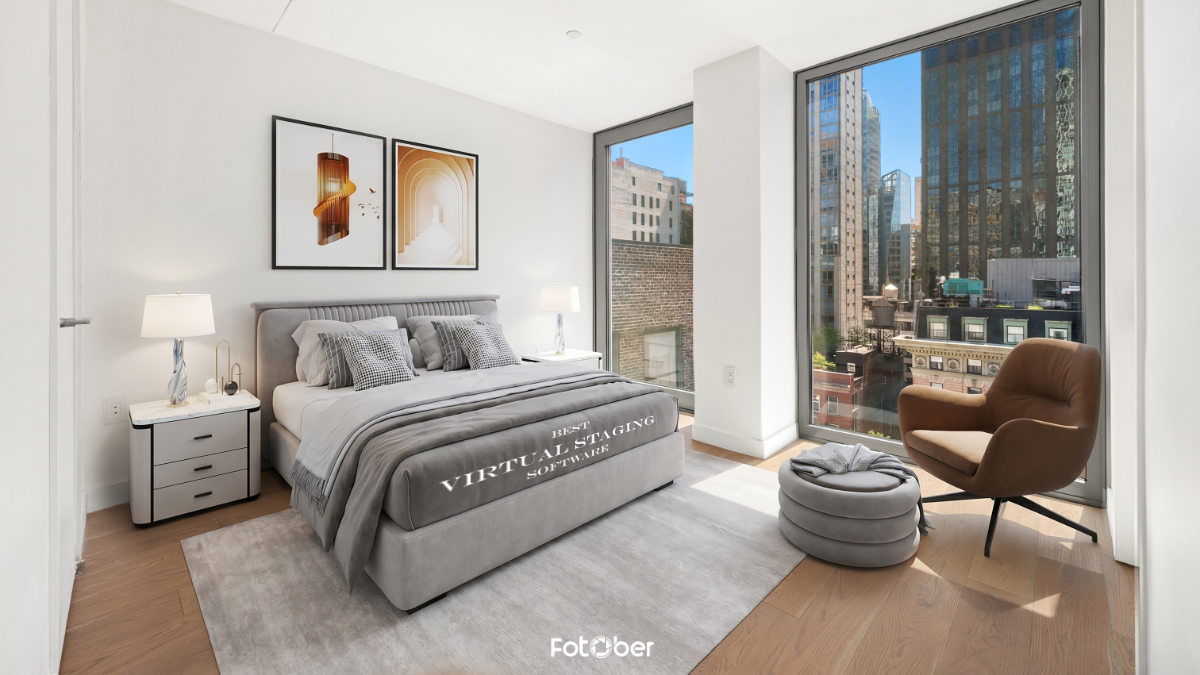

Share:
Table of Contents
- 1. How we tested & evaluated the tools to find out the best software for virtual staging
- 2. Deep dive: The 8 best virtual staging software tools
- • 2.1. Edensign: Best overall for speed & multi-view consistency
- • 2.2. BoxBrownie: Best for all-in-one real estate photo services
- • 2.3. MeltFlex: Best for interactive & e-commerce integration
- • 2.4. Styldod: Best premium designer quality for luxury listings
- • 2.5. Virtual Staging AI (by Zillow): Best for high-volume brokerages
- • 2.6. Apply Design: Best hybrid DIY browser editor
- • 2.7. Remodel AI: Best unlimited subscription for independent agents
- • 2.8. AI HomeDesign: Best instant auto-staging with chat edits
- • 2.9. Comparison matrix: Side-by-side evaluation of the best virtual home staging software
- 3. Buyer’s guide: How to choose the right virtual home staging software for your business
- 4. Best practices for using the best virtual home staging software
- 5. Frequently asked questions about virtual home staging software (FAQs)
- 6. Conclusion
First impressions matter in real estate, where listings with premium visuals capture 87% more views. Yet, traditional physical staging can drain your budget, costing upwards of $2,000 to $6,000 per property. In today's fast-moving market, waiting days for physical setups means losing eager buyers. Fortunately, the industry has shifted. Virtual staging is now very accessible and helps sell homes faster. Whether you need instant AI speed or premium human-led designs, choosing the best virtual home staging software will elevate your listings, save thousands, and captivate modern buyers instantly.
1. How we tested & evaluated the tools to find out the best software for virtual staging
To find the absolute best virtual home staging software on the market, we didn't just look at marketing promises or slick landing pages. We established a rigorous, transparent testing protocol to ensure our recommendations are grounded in real-world performance.
We began by sourcing two identical raw, unedited base photographs: a vacant, low-lit living room with hardwood floors and an empty master bedroom featuring complex, angular walls. We processed these exact same images through every single platform on this list to evaluate how each rendering engine handled spatial depth, ambient lighting, and architectural boundaries.
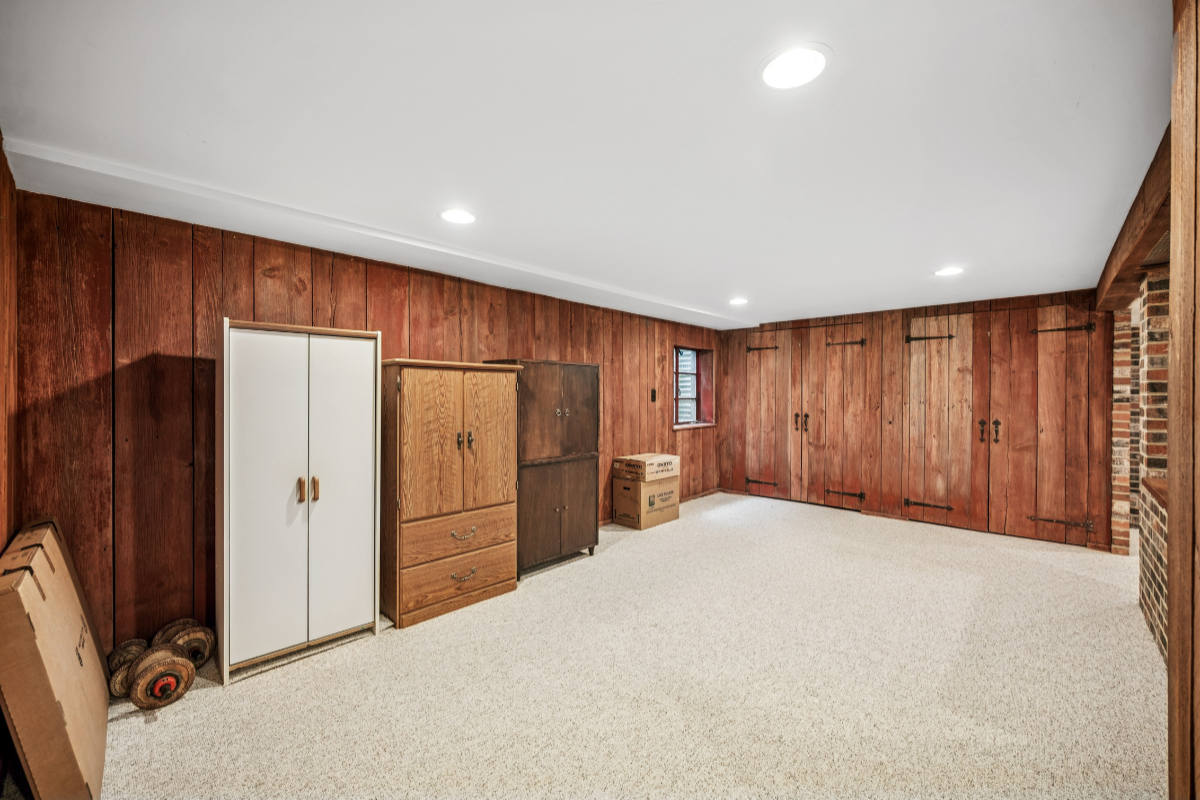 We use one image whenever possible to see how each software processes our virtual staging request.
Our evaluation relied on four core benchmarks:
- Photorealism & scale: We analyzed shadow placement, light source direction, and whether the digital furniture looked truly embedded in the room or awkwardly "floating" on the floor.
- Turnaround velocity: We clocked the delivery times, measuring instant 10-second AI generation speeds against traditional 24-to-48-hour professional human designer workflows.
- Multi-angle consistency: A major pain point for agents is continuity. We tested whether the software could maintain identical furniture styles and layouts when staging the same room from two different viewpoints.
- User experience (UX): We assessed the learning curve for everyday real estate agents and photographers who aren't tech-savvy digital artists.
By ranking each tool against these precise standards, we cut through the hype to help you identify the best virtual staging software for your specific listing workflow, volume, and budget.
2. Deep dive: The 8 best virtual staging software tools
The virtual staging landscape is broadly split into two camps: AI-Driven engines that deliver results in seconds for pennies on the dollar, and Human-Led services where digital interior designers manually render every detail for maximum photorealism.
Here is our definitive, real-world analysis of the top eight platforms available today.
2.1. Edensign: Best overall for speed & multi-view consistency
Edensign solves one of the biggest headaches in AI real estate marketing: multi-angle layout drift. While generic AI tools change the furniture layout when you upload a different angle of the same vacant room, Edensign utilizes a spatial anchor system to keep your digital decor perfectly consistent across every shot.
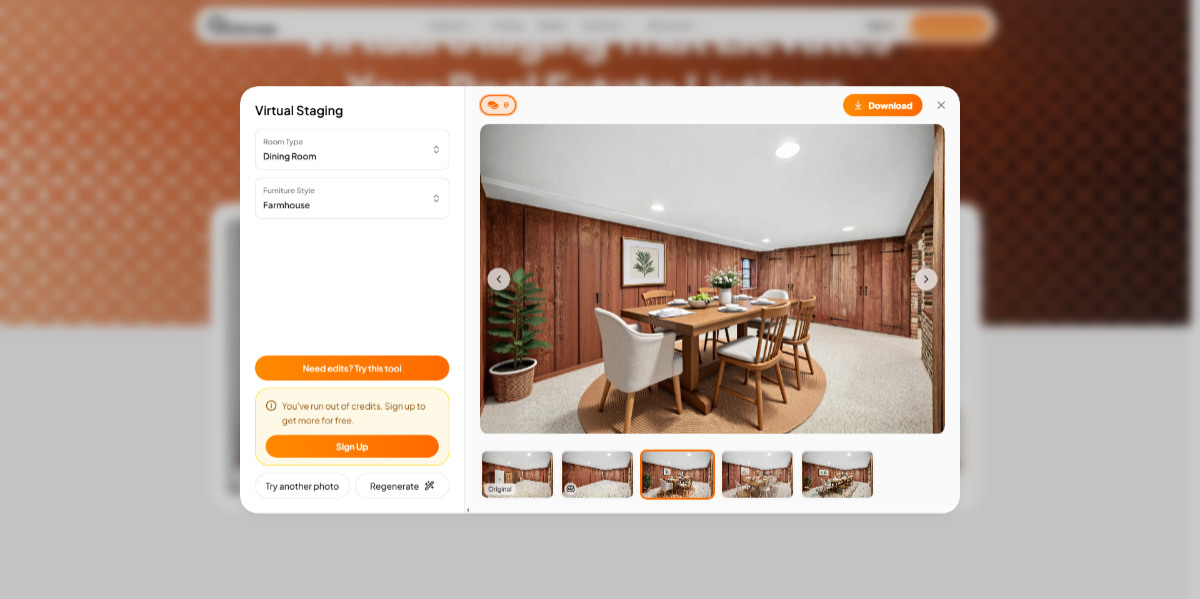 Edensign is the best option for consistency and speed.
- Key features: Smart multi-view spatial mapping, automatic architectural border detection, and lighting calibration.
- Pros: Generates stunning, high-definition spaces in under 30 seconds; flawless perspective alignment prevents furniture from looking skewed.
- Cons: The web application lacks micro-level manual furniture rotation tools.
- Pricing: Subscription-based tiers starting at $19/month, driving down bulk virtual staging costs to roughly $0.28 to $0.40 per image.
2.2. BoxBrownie: Best for all-in-one real estate photo services
BoxBrownie remains a gold standard for agents who favor absolute photorealism over instant turnaround. Instead of algorithms, your photos are assigned to elite digital artists who carefully place authentic 3D models into your property images using industrial-grade rendering software.
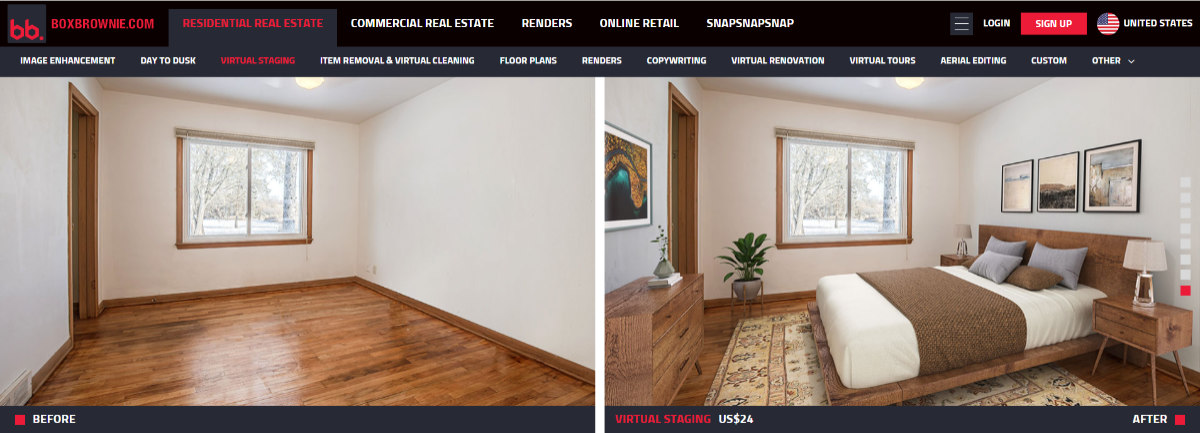 BoxBrownie has been around for a long time and is still reigning over its competitors in terms of refined quality and customizability.
- Key features: Full-service dashboard featuring virtual staging, professional photo enhancement, day-to-dusk sky replacement, and complete virtual renovations.
- Pros: Incredible attention to detail; shadows, glass reflections, and textures look entirely real; handles complex commercial layouts easily.
- Cons: Standard turnaround takes 24 to 48 hours; style adjustments require filing a new revision request.
- Pricing: Straightforward pay-as-you-go model at $24.00 to $30.00 per virtually staged image, with no recurring monthly subscriptions.
2.3. MeltFlex: Best for interactive & e-commerce integration
MeltFlex stands out by bridging the gap between property visualization and actual interior design. It uses an advanced AI engine to dress vacant properties, but the true innovation lies in its "shoppable renders." Every piece of furniture placed inside the photo corresponds to real-world decor items from global retailers.
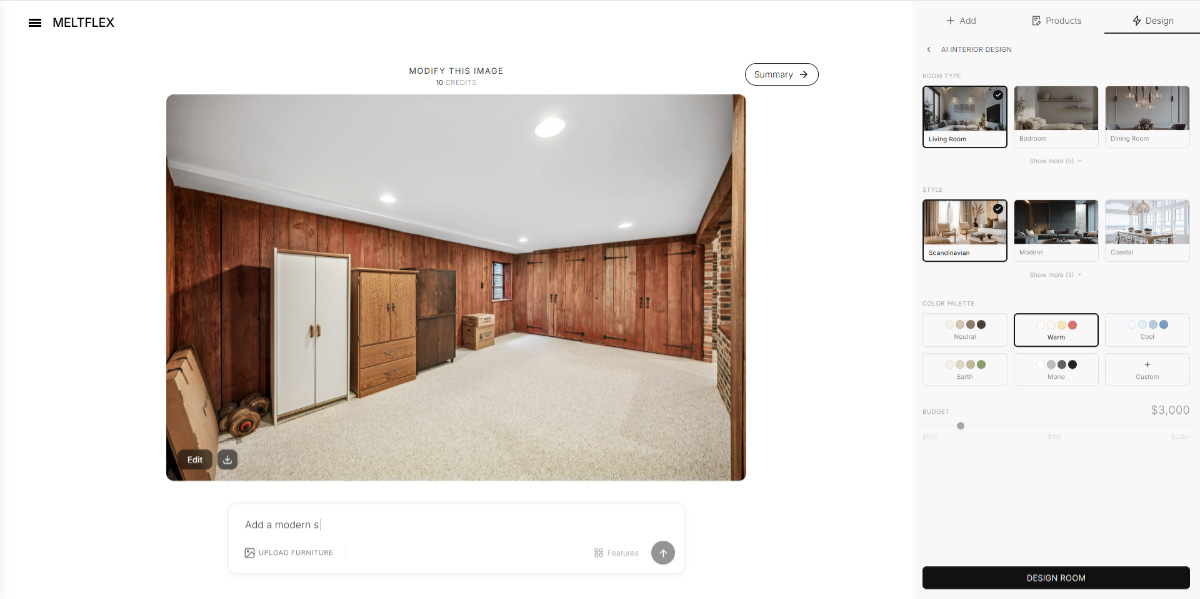 MeltFlex feels fun and sleek to use, like browsing an online store.
- Key features: Shoppable staging asset links, 4K high-speed rendering pipelines, instant exterior landscaping modes.
- Pros: Buyers can actually purchase the exact design look they see online; excellent rendering speed of under 45 seconds.
- Cons: The user dashboard features extensive customization panels that require a brief learning curve.
- Pricing: Standard credits scale with monthly tiers, averaging between $0.30 and $0.80 per finalized image.
2.4. Styldod: Best premium designer quality for luxury listings
Styldod is a premium design studio that blends rapid automation workflows with human artistic oversight. Its ReimagineHome software is specifically tailored for agents representing high-end real estate who require curated luxury design styles, such as Scandinavian Minimalist or Industrial Chic, without the exorbitant fees of physical staging.
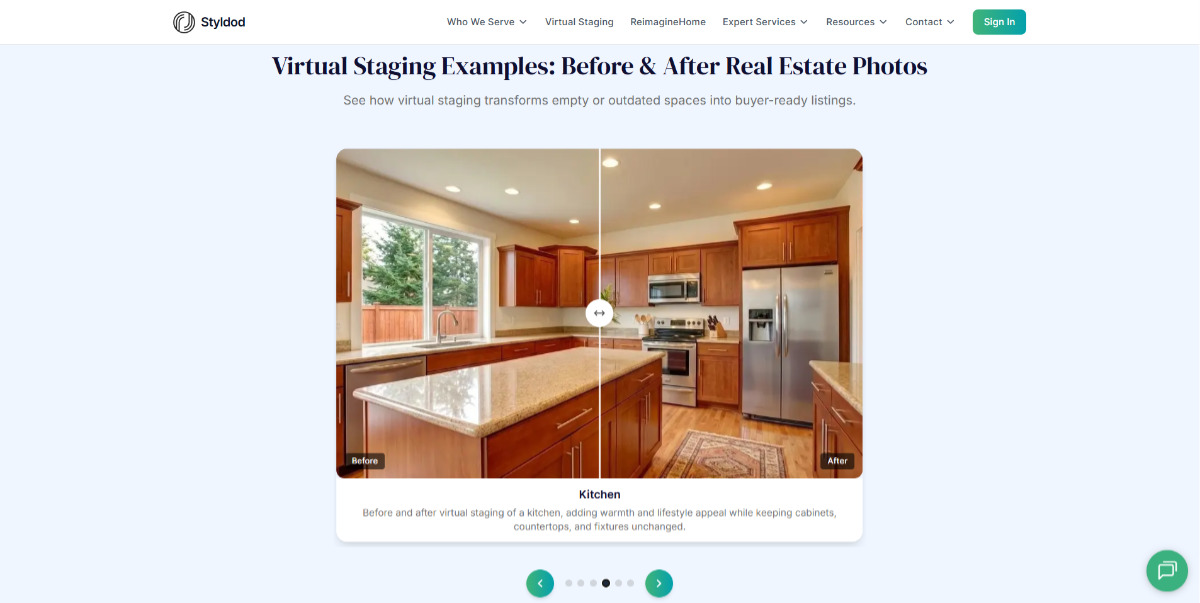 Agents who want to nail the premium architectural styles will likely be satisfied by Styldod.
- Key features: Virtual furniture removal, comprehensive structural renovations (changing cabinetry or flooring), and commercial marketing licensing.
- Pros: Delivers magazine-quality aesthetics; highly adaptive customer support; offers unlimited revisions until satisfied.
- Cons: Processing can stretch to 24 hours during peak real estate seasons.
- Pricing: Pay-per-image pricing ranging from $16.00 to $23.00 per vacant photo, depending on order size and structure.
2.5. Virtual Staging AI (by Zillow): Best for high-volume brokerages
Engineered specifically for speed and massive scaling, Virtual Staging AI handles the heavy lifting for high-volume brokerages and fast-moving property rental firms. Backed by extensive property datasets, this pure automated platform requires zero design knowledge to operate.
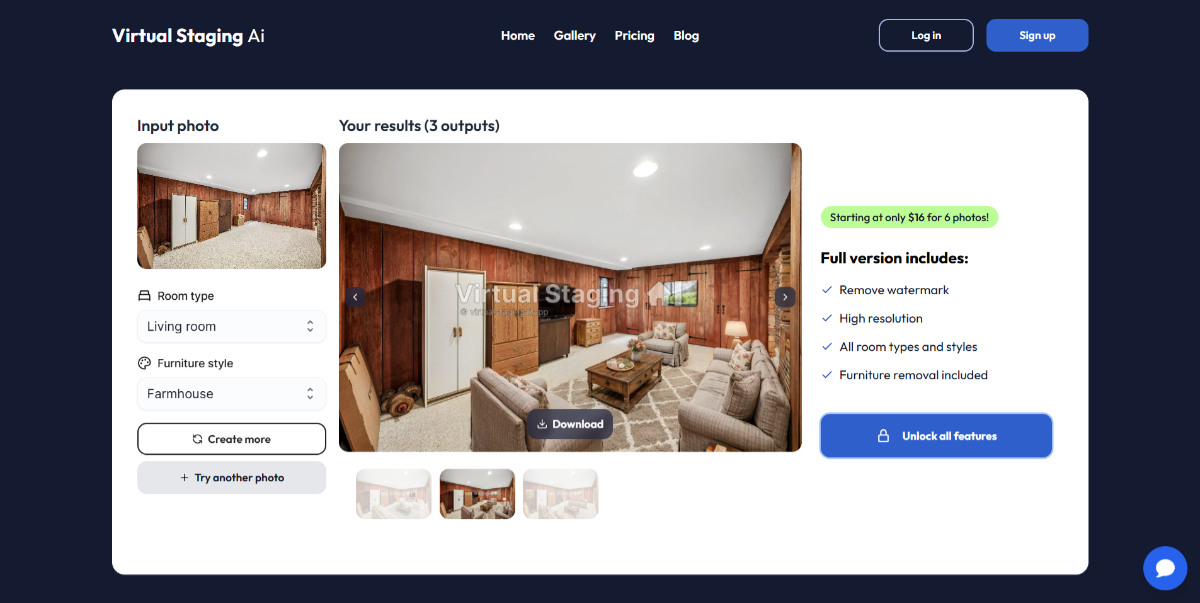 Virtual Staging is getting there with decent quality for high-volume listings.
- Key features: One-click automated asset placement, native MLS formatting compliance, and direct Zillow ecosystem integrations.
- Pros: Blazing-fast 10-second processing times; incredibly intuitive interface that functions flawlessly on mobile devices.
- Cons: Lacks deep layout customization; you cannot select individual chairs or fine-tune exact item coordinates.
- Pricing: Ranges from a Basic plan at $16.00/month (6 photos) up to an Enterprise tier at $79.00/month (150 photos), dropping the unit cost to $0.53 per photo.
2.6. Apply Design: Best hybrid DIY browser editor
Apply Design offers a brilliant compromise for real estate professionals who want full creative control without paying thousands for a 3D designer. Operating inside your desktop web browser, it allows you to drag, drop, rotate, and scale hundreds of designer-curated furniture sets directly into your uploaded space.
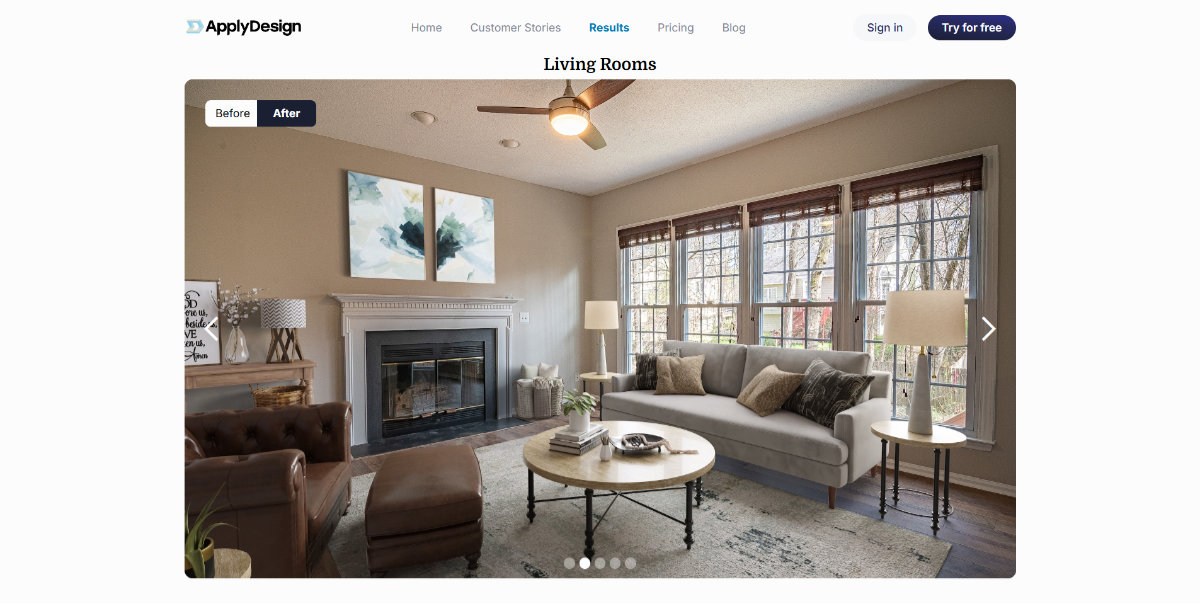 Apply Design allows you to do what its name literally implies: “apply design” directly onto the photo.
- Key features: Interactive 3D browser-based drag-and-drop studio, instant automated "one-click" placement mode, 360-degree virtual tour builder.
- Pros: Total granular control over layout arrangement; lets you mix and match distinct decor collections; budget-friendly entry fees.
- Cons: Staging manually requires real design instincts and can take 10 to 15 minutes per image.
- Pricing: Uses a coin-based system; manual DIY staging costs 1 coin (~$7.00) while automated AI staging costs 1.5 coins (~$10.50) per photo.
2.7. Remodel AI: Best unlimited subscription for independent agents
For independent listing agents and property managers handling dozens of vacant spaces simultaneously, per-image pricing can rapidly inflate a marketing budget. Remodel AI fixes this bottleneck by providing a robust desktop and mobile platform built entirely around flat-rate, unrestricted rendering.
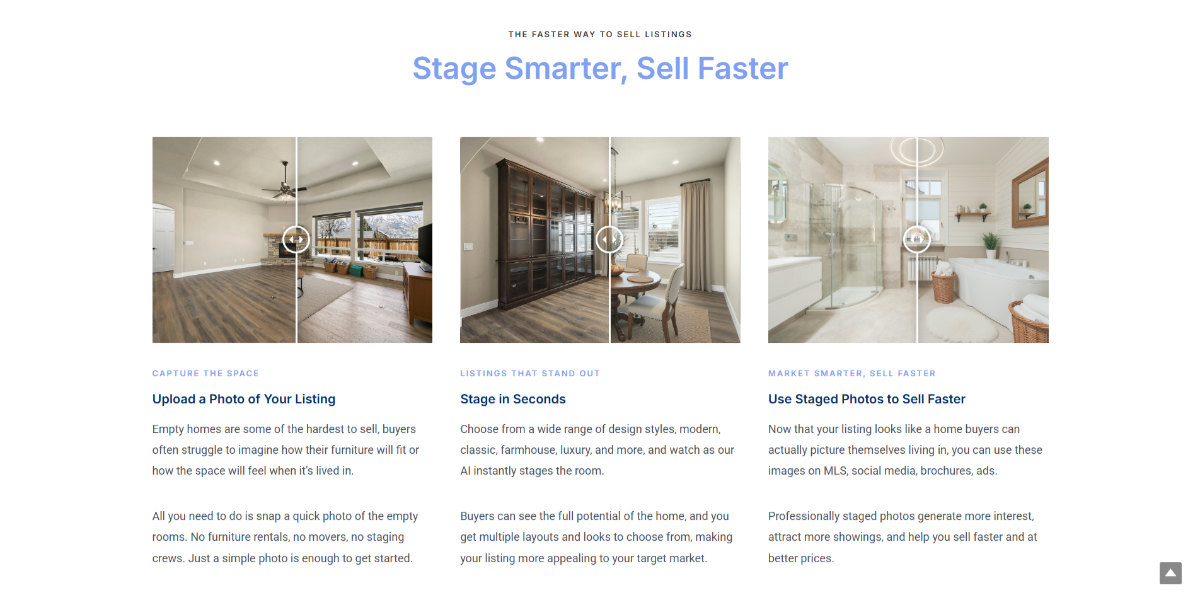 Remodel AI offers unprecedented volume with the unlimited generation subscription.
- Key features: Unlimited generation engine, built-in object eraser for instant room decluttering, and over 30 distinct interior design profiles.
- Pros: Incredible value for high-volume users; features a highly functional mobile app perfect for on-site client presentations.
- Cons: Complex geometric rooms with unusual window placements can occasionally cause small visual glitches.
- Pricing: A highly disruptive Pro subscription model priced at $29.00 per month for completely unlimited image generations.
2.8. AI HomeDesign: Best instant auto-staging with chat edits
AI HomeDesign pairs an ultra-fast generation model with an innovative conversational AI workspace. Instead of navigating confusing adjustment sliders or re-uploading failed renders, users can literally chat with the software to modify the layout, swap design trends, or change specific object colors.
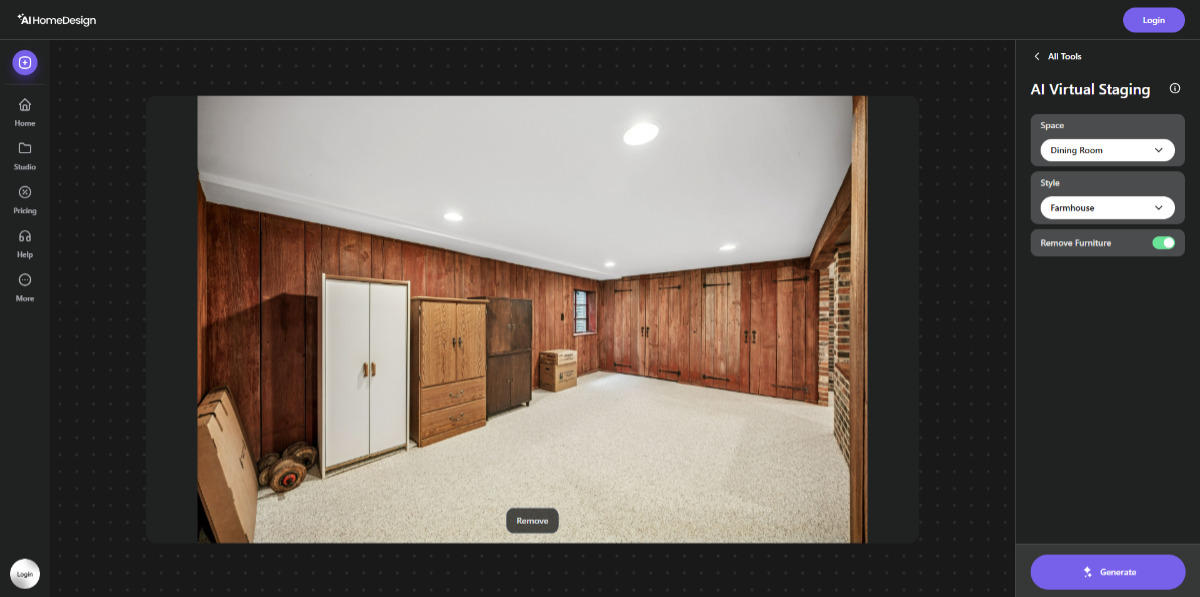 If you prefer prompting, such as with ChatGPT, you may get up and running pretty quickly with AI HomeDesign.
- Key features: Natural language text-to-edit interface, rapid 5-second generation cycles, native automated brightness and white-balance correction.
- Pros: Making changes is as simple as typing "replace the dark rug with a light cream bohemian rug"; lightning-fast initial results.
- Cons: Base automated styles can occasionally look a bit generic before you execute custom chat instructions.
- Pricing: Bulk credit models scale down sharply to roughly $0.24 per image on high-tier monthly packages.
2.9. Comparison matrix: Side-by-side evaluation of the best virtual home staging software
To help you cut through the noise and match the right platform to your business model, we compiled our testing data into a highly scannable matrix. Whether your priority is shaving turnaround times down to seconds or securing museum-grade photorealism for a high-end estate, this breakdown highlights how the industry's top players stack up in terms of technology, processing speed, and real-world costs.
|
Platform |
Core technology |
Turnaround time |
Price model / Estimated cost |
Best for |
|
Edensign |
AI-driven |
Under 30 seconds |
Subscription (~$0.28 – $0.40 / image) |
Multi-angle layout consistency |
|
BoxBrownie |
Human-led |
24 – 48 hours |
Pay-per-image (~$24.00 – $30.00 / image) |
Premium luxury & complex commercial edits |
|
MeltFlex |
AI-driven |
Under 45 seconds |
Credits (~$0.30 – $0.80 / image) |
Shoppable, interactive real-world furniture |
|
Styldod |
Human-led |
Up to 24 hours |
Pay-per-image (~$16.00 – $23.00 / image) |
Magazine-quality aesthetics & renovations |
|
Virtual Staging AI |
AI-driven |
10 seconds |
Subscription (~$0.53 / image on bulk tiers) |
High-volume brokerages seeking raw speed |
|
Apply Design |
Hybrid DIY |
10 – 15 minutes |
Coin-based (~$7.00 – $10.50 / image) |
Granular drag-and-drop structural control |
|
Remodel AI |
AI-driven |
Instant |
Flat-rate ($29.00 / month unlimited) |
Solo agents managing multiple listings |
|
AI HomeDesign |
AI-driven |
5 seconds |
Credits (~$0.24 / image on bulk tiers) |
Rapid, natural-language chat adjustments |
Pro-Tip: If you are marketing mid-tier rentals or suburban homes under tight deadlines, lean into an AI-driven tool like Edensign or Remodel AI. For listings clearing the million-dollar threshold, the manual light-casting and flawless textures of a human-led studio like BoxBrownie or Styldod are well worth the 24-hour wait.
3. Buyer’s guide: How to choose the right virtual home staging software for your business
Selecting the best virtual home staging software is about finding a tool that seamlessly integrates into your operational workflow, market tier, and listing volume. To make the right investment, focus on three critical decision pillars rather than obsessing with feature lists.
3.1. The volume vs. quality trade-off
Your typical property tier should dictate your tech stack. If you represent high-volume, mid-market rentals or suburban family homes, AI-driven software is an absolute game-changer. It allows you to close the "visualization gap" for buyers and push listings live on the MLS within minutes for pennies on the dollar. However, if you regularly market luxury estates clearing the million-dollar mark, the meticulous shadow casting, custom lighting reflections, and premium materials of a human-led studio are well worth the 24-hour turnaround time.
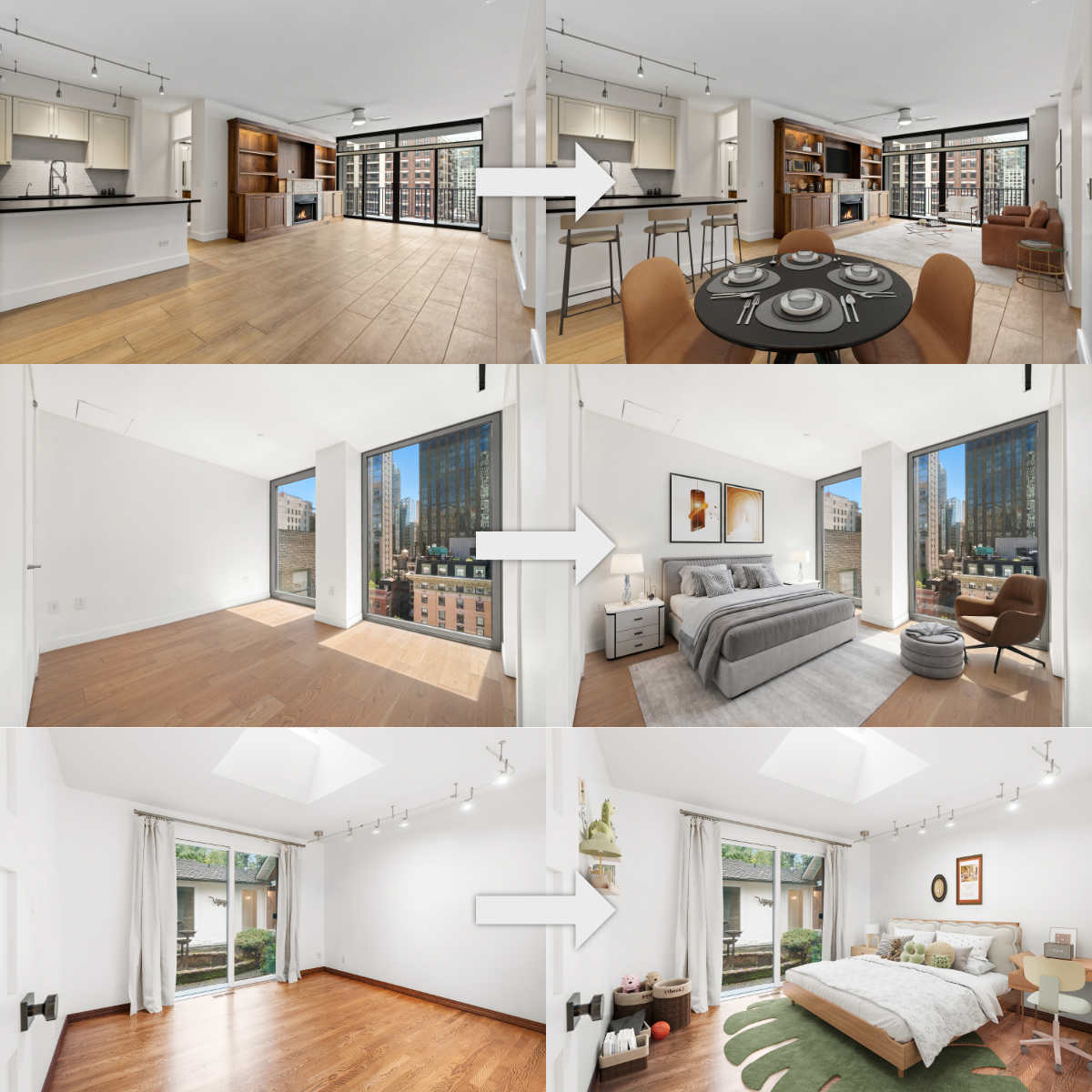 The sheer speed of AI-backed virtual staging software is a lifesaver for agents with multiple listings to sell at once.
3.2. Pricing structure and consistency
Are your listings sporadic or steady?
- Pay-per-image models are perfect for independent agents or FSBO (For Sale By Owner) sellers who only need virtual staging a few times a year. You only pay for what you use, keeping your marketing overhead entirely variable.
- Monthly subscriptions or flat-rate credit tiers are vastly superior for dedicated real estate photographers or large brokerages processing multiple vacant spaces monthly. Uncapped subscription models radically cut your cost-per-render, allowing you to stage secondary rooms like home offices and guest bedrooms for free.
3.3. Compliance and white-labeling
Always verify how the software outputs your final assets. Professional real estate photographers should look for platforms offering white-label dashboards to deliver clean, unbranded galleries directly to clients without exposing the backend tool. Additionally, ensure the platform lets you seamlessly apply "virtually staged" text overlays to keep your online marketing strictly compliant with local MLS truth-in-advertising guidelines.
4. Best practices for using the best virtual home staging software
To truly harness the power of virtual home staging, there are several best practices to consider. These strategies can enhance your marketing efforts and improve overall client engagement.
4.1. Choose the right property feature to highlight
Choosing the right features to showcase is critical to the staging process. Focus on areas that typically attract buyer interest, such as kitchens, living rooms, and outdoor spaces.
Highlighting architectural elements, such as fireplaces or built-in shelves, can add character and charm to your images. Additionally, pay attention to the flow of the space. Properly staging a room can demonstrate how different areas connect and function together, helping potential buyers envision themselves living there.
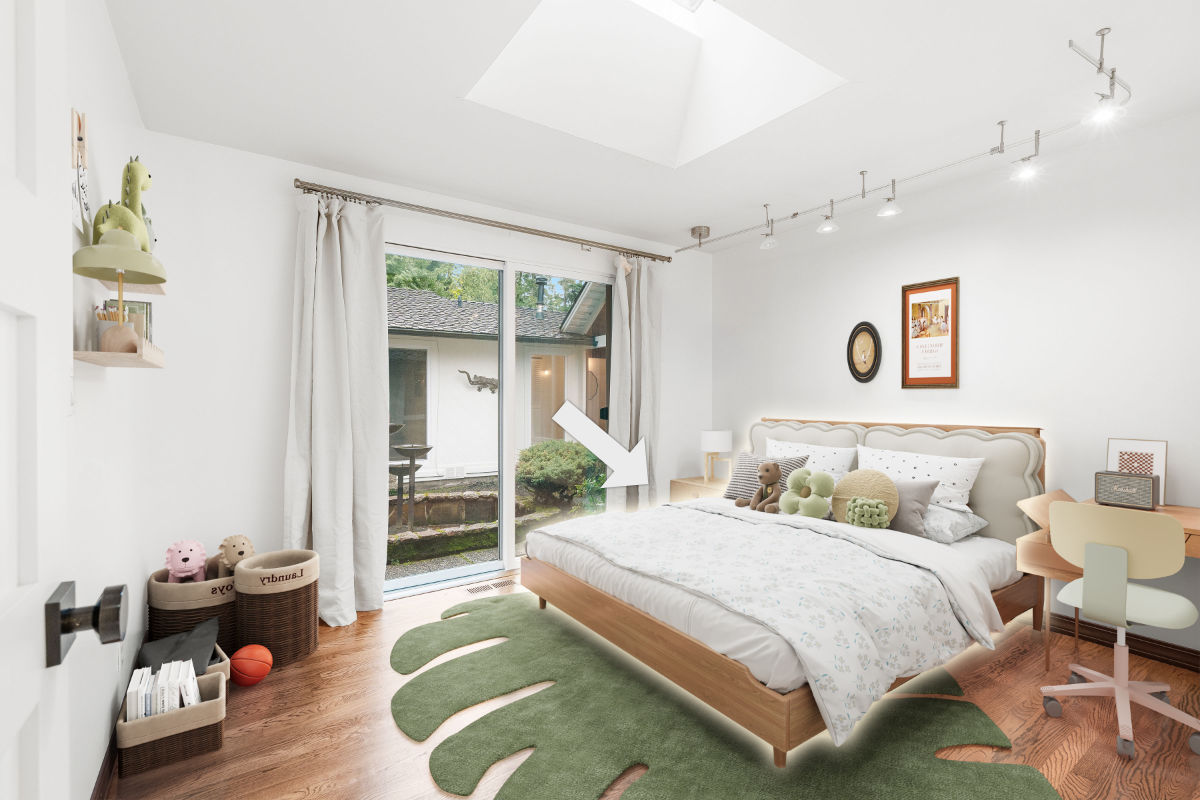 Choosing the right features to showcase is critical to the staging process.
Conversely, avoid overcrowding a space with too much furniture. The goal is to create an open, inviting atmosphere. Instead, opt for a few key pieces that define the space while still allowing for movement and functionality.
4.2. Consistency in image style
Even with the best virtual home staging software, maintaining consistency in styling across your images is obligatory, as this practice will help establish a strong brand identity. Utilize similar furnishings and color palettes within each listing to provide a professional look.
Consider adopting a signature style that resonates with your target audience. For instance, if targeting young families, bright and cheerful designs may work well, whereas luxury properties may benefit from more muted, sophisticated styles.
Real estate photography editing techniques should also remain consistent. Use similar filters or enhancements across your images to create a cohesive portfolio. Clients will appreciate the professionalism represented in your imagery.
4.3. Test different styles and formats
A successful virtual staging strategy often involves experimentation. Testing different styles can yield valuable insights into what appeals to potential buyers. Don’t hesitate to try various color palettes, types of furniture, and layouts.
Consider surveying past clients or gathering feedback from fellow agents regarding your staged images. This input can guide future decisions and help you refine your staging approach.
Additionally, explore alternative formats beyond standard images, such as video walkthroughs or virtual tours. These dynamic formats can intrigue buyers and allow them to engage more deeply with your listings.
5. Frequently asked questions about virtual home staging software (FAQs)
Q1: Is virtual staging allowed on MLS listings?
Yes, virtual staging is fully permitted by most Multiple Listing Services (MLS), but proper disclosure is mandatory. To maintain transparency and avoid misleading prospective buyers, you must flag the images as "virtually staged" using a visible photo watermark or by checking the appropriate disclosure box within your local listing dashboard.
Q2: What is the difference between AI virtual staging and 3D rendering?
AI virtual staging uses advanced algorithms to read an existing photograph of a vacant room and layer realistic furniture over it in seconds. In contrast, traditional 3D rendering builds a digital model of the entire property completely from scratch using architectural blueprints. AI is ideal for existing empty homes, while 3D rendering is reserved for pre-construction marketing.
Q3: Can virtual staging software remove existing cluttered or outdated furniture?
Absolutely. Premium platforms and the best virtual home staging software now offer integrated "item removal" or "decluttering" modules. The engine intelligently erases old furniture, digitally reconstructs the hidden walls and flooring behind it, and then layers fresh, modern decor seamlessly over the newly cleared space.
Q4: Do I need interior design experience to use these platforms?
Not anymore. While hybrid tools give you manual control, modern AI-driven platforms offer pre-styled room sets curated by professional interior designers. You simply select a style profile, like "Modern Contemporary" or "Rustic Transitional", and the software handles the asset placement automatically.
6. Conclusion
Transforming vacant, cold spaces into warm, inviting homes no longer requires thousands of dollars or logistical headaches. Finding the best virtual home staging software boils down to balancing your specific listing volume, target budget, and desired photorealism. For rapid scaling and high-volume listings, leverage the instant speed and cost-efficiency of AI-driven platforms. For high-end luxury portfolios, trust manual human artistry to capture every intricate detail.
Don't let your properties sit empty on the market. Take the next step today: select an option from our list, sign up for a free trial, and see your listings transform instantly.
Follow us on social media to stay updated with trending architectural visualization for selling residential homes better.
- Facebook: fotobermedia.co
- YouTube: Fotober
- TikTok: @fotober
- Instagram: fotober_media.
Related posts

Cincinnati Housing Market 2026: Prices, Trends, and What It Means for Buyers, Sellers, and Investors
October 20, 2026

Modern Luxe Interior Design: Elements, Style Guide and How to Stage It
October 10, 2026

Minimalist Interior Design: Characteristics, Style Guide, and Staging
October 8, 2026

Coastal Interior Design: Style Definition & Staging Guide
September 30, 2026
